VW has begun assembly of its all-electric SUV on US shores.
Why it matters
This should help improve supply while also bringing more jobs to Tennessee.
What's next
A cheaper, smaller-battery flavor of the ID 4 is due next year.
If you prefer US-made cars, you can today add Volkswagen's ID 4 to your list. Well, to the list of products assembled in the US, anyway. VW today delivered on its long-pledged promise to bring EV production to its Chattanooga, Tennessee, factory, with the first cars rolling off the line now ahead of anticipated October deliveries. It joins other American-assembled EVs such as Tesla's sedans and SUVs, GM's Bolt family, the Nissan Leaf and the upcoming Cadillac Lyriq.
Plans for this were announced way back in the beginning of 2019, with VW making an $800 million investment into its Chattanooga facility to enable production of what back then was still called the ID Crozz. Today, US-made ID 4 vehicles will use components "mainly" sourced from North America, including Alabama steel and Georgia battery packs from SK Innovation.
Something had to go to make room for ID 4 production, and sadly that something was the Passat. VW's venerable sedan was just one of many four-doors put to pasture over the past few years as consumers demand more and more crossover SUVs. With that, Chattanooga becomes the sixth facility globally capable of producing VW's MEB-based EVs, a platform that includes the not-for-US ID 3 and the long-awaited ID Buzz.
The first flavors of ID 4 built in the US will be all- or rear-wheel-drive with the larger 82-kilowatt-hour battery pack. The promised, more affordable, 62 kWh version is still on target for next year. No pricing on that yet, but we're hoping it'll fall somewhere in the mid-$30,000 range.
How We Might Get Better Sleep, According to Our Ancestors
How We Might Get Better Sleep, According to Our Ancestors
Losing out on glorious sleep because you woke up at 3 a.m. can feel like standing next to a running faucet while you're thirsty. But what if I told you that throughout human history, waking up in the middle of the night was a completely normal event, and that sleeping in two shifts might actually save you some stress instead of causing it?
Biphasic sleep is a pattern of sleep where people doze off during two different times during a 24-hour period. Most of us are used to a monophasic sleep pattern, or one period of sleep that lasts roughly 8 hours.
Some reports on earlier time periods, many of them thanks to the research of historian Roger Ekirch, suggest that we might actually be hard-wired for biphasic sleep. Stories of earlier humans going to sleep when it got dark, only to rouse around midnight to cook, talk with your neighbor, do a chore or more, then go back to sleep until morning offer glimmers of interest to those of us who have a hard time staying asleep throughout the night.
"It wasn't pathologized or weird, it was just what you did," said Sara Mednick, a professor in the Department of Cognitive Science at the University of California, Irvine. She's the author of The Power of the Downstate: Recharge Your Life Using Your Body's Own Restorative Systems.
"This idea that we should be sleeping in one solid dose is a pretty new phenomenon," she added.
But the reasons for that may have less to do with how our brains are hard-wired for sleep, and more to do with how we evolved as a culture and a working society.
Here's what we know.
See more: Best Mattress for 2022
Modern work patterns and everyday demands might be some reasons our sleep schedules don't follow a biphasic sleeping pattern.
Virojt Changyencham/Getty Images
What counts as biphasic sleep, and why did people do it?
Biphasic sleep is any two segments of sleep in a single day. That could mean getting 6 continuous hours of sleep at night, and then a short nap during the day. Or you could follow the more historic pattern in literature of going to bed relatively early right when it gets dark (around 8 or 9 p.m.), waking up in the middle of the night for an hour or two and then going back to sleep until the morning sunshine hits your eyes. But the latter, more sunlight-based approach might be more difficult for most people who follow a more structured 9 a.m. to 5 p.m. workday.
"I'm not sure how many people could adapt to that kind of schedule," said Dr. Federico Cerrone, who specializes in respiratory health and sleep medicine at Atlantic Health System. He said that while there is evidence that people once slept in at least two segments per day, the historical circumstances were very different. Homes were candlelit, so people didn't have artificial light to keep them awake, and they worked to different schedules. This was before the Industrial Revolution in the US, when our bodies' rhythms became more stitched to our work schedules.
Some people still participate in biphasic sleep regularly today, and it may be more common in some cultures.
"People have been taking siestas a long time," Cerrone noted.
While biphasic sleep is also segmented, it's different from polyphasic sleep, which comes in different patterns people might try for productivity. But it can drastically cut down the number of sleep hours and be an "unmitigated disaster" for one's health, according to CNET's Mark Serrels.
See more: Best Mattress for Side Sleepers
Who should try it?
According to Cerrone, there's no big benefit to biphasic sleep over monophasic sleep -- or vice versa -- so long as you're getting the recommended amount of sleep, which is at least 7 hours for most people.
"Let's just get enough sleep," Cerrone said. He added that despite historical evidence people used to sleep in at least two segments, "there's no proof to say that's a good schedule."
But for people who commonly wake up in the middle of the night -- and then agonize over it -- embracing a biphasic sleep schedule might help unstick you from a sleep-deprived loop. People often wake up in the night, then become scared because they think they have insomnia, Mednick says. Perhaps trying biphasic sleep safely could help you break that cycle.
"It all depends on how people feel once they try to be biphasic," Mednick said. If adjusting your sleep cycle into two segments is helpful, keep using it. (Maybe you've tried the ancestral way of going to bed early, then going to bed again in the early morning.) If you feel unwell or you have symptoms of sleep deprivation, don't keep trying to make it work.
And if you do lean into biphasic sleep, listen to your body's natural cues telling you to rest. "Go to sleep the second you're getting tired," Mednick said. "Don't try to soldier on."
For tips on how to get better sleep, check out our article on the best 7 foods for sleep or consider these natural sleep aids to help insomnia.
The information contained in this article is for educational and informational purposes only and is not intended as health or medical advice. Always consult a physician or other qualified health provider regarding any questions you may have about a medical condition or health objectives.
Beyerdynamic Free Byrd Earbuds Review: Great Sound for $249
Beyerdynamic Free Byrd Earbuds Review: Great Sound for $249
Beyerdynamic may be late to the game, but it's finally introduced its first true-wireless earbuds, and they come with a name that might remind a few folks of Lynyrd Skynyrd's signature song. Available now in two colors for $249 (£199 or roughly AU$350), the Free Byrd earbuds have active noise canceling, up to 11 hours of battery life and impressive sound quality.
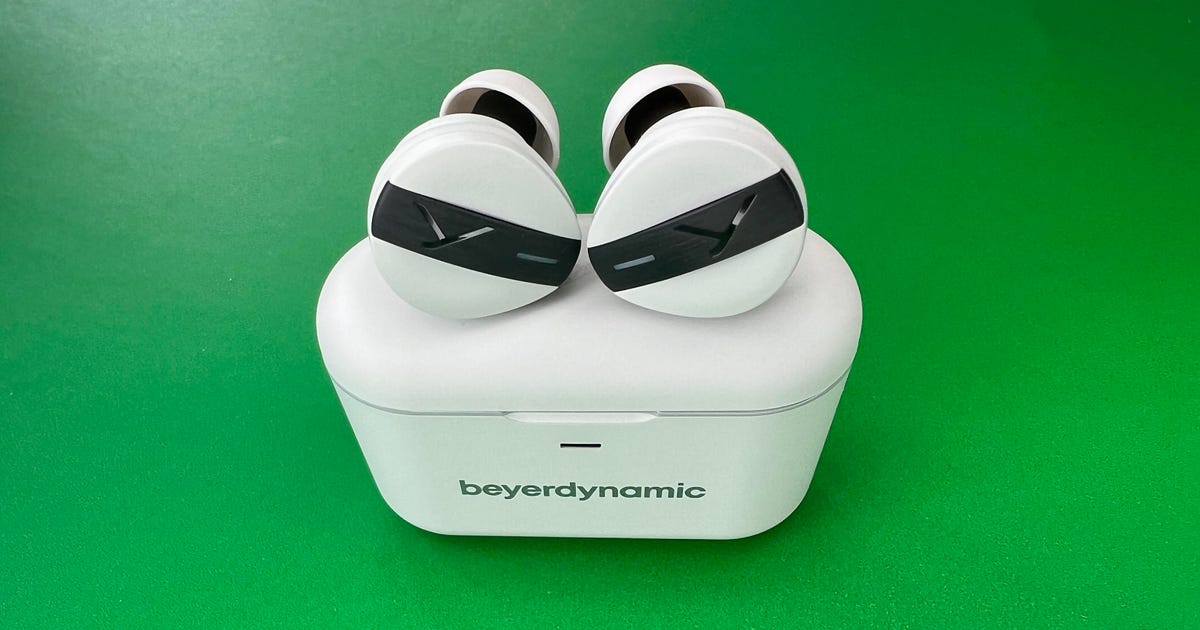
As is the case with a lot of higher-end earbuds that prioritize sound quality, the Free Byrd buds are on the larger side, weighing in at 7 grams each (by comparison, Sony's WF-1000XM4 buds weigh 7.3 grams each). Their wireless charging case also has some heft to it and feels quite solid. It's not super compact but isn't bulky. It's similar in size to the WF-1000XM4's charging case.
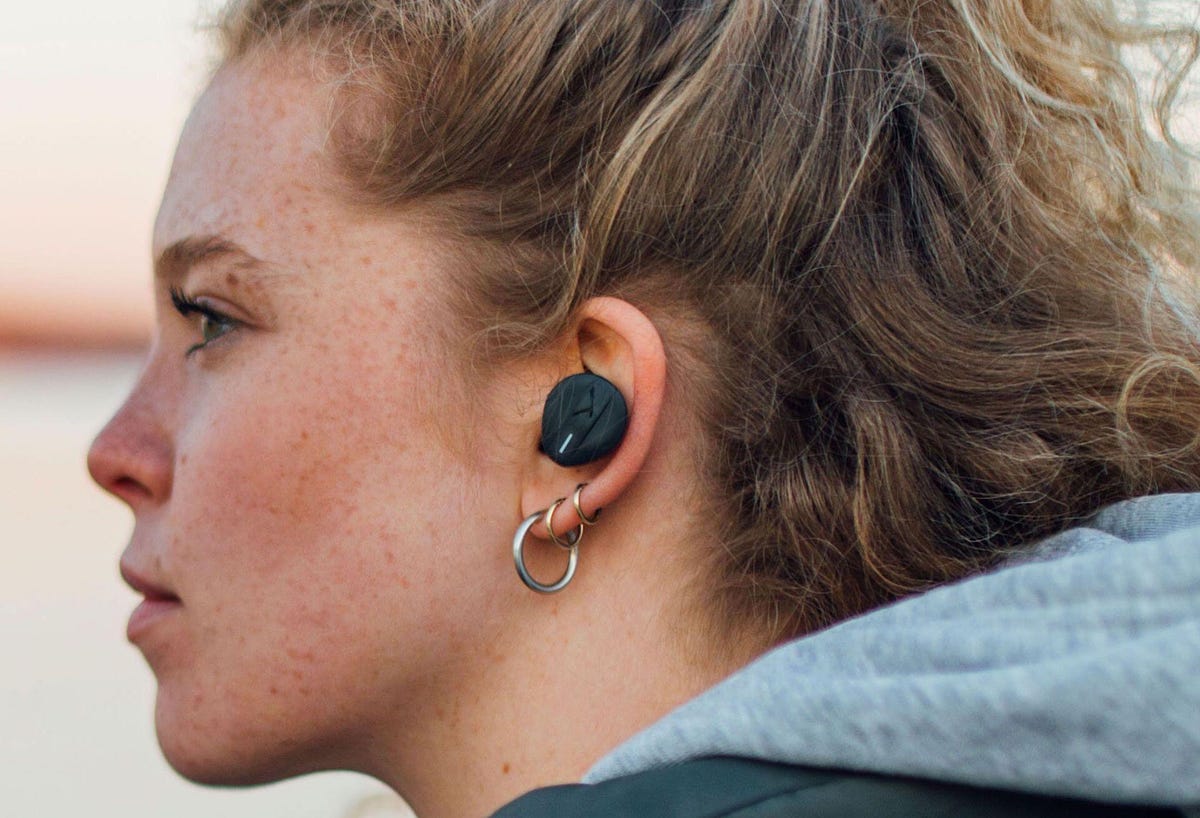
Getting a tight seal is crucial for optimal sound quality and noise-canceling performance. Beyerdynamic offers an assortment of silicone and foam ear tips to help you get that seal. I personally prefer silicone tips. While I got a pretty tight seal with the largest silicone ear tip, the buds wouldn't stay in my ears securely, so I opted for the largest foam tip, which has more grip to it and gave me the best and most comfortable fit. (I could run with the earbuds using the foam tips -- they're IPX4 splash-proof.)
The earbuds do stick out a bit, but not too badly.
Beyerdynamic
You should be able to get a good fit with one of the included ear tips, but I can't guarantee that these buds will be a good match for everybody's ears. Their design isn't as straightforward as, say, Apple's AirPods Pro, so I suspect some people might feel some discomfort depending on the shape of their ears. But I ended up being pretty pleased with the fit, though I preferred the fit of Sennheiser's Momentum True Wireless 3 earbuds.
The earbuds have touch controls and they worked well enough for me after some trial and error and after consulting the manual in the Miy companion app for iOS and Android. It was initially tricky to adjust the volume (double-tap and hold on the second tap) and you have to triple-tap to advance tracks. But it becomes more intuitive with time.
The buds in their case.
David Carnoy/CNET
You double-tap to toggle between noise-canceling mode and a transparency mode. The noise cancellation is effective, though it's a clear step below what Bose and Sony offer on their flagship earbuds. The transparency mode sounds natural, which is good, but I wouldn't expect stellar noise-canceling performance from these.
Additional features include ear-detection sensors, which pause your music when you take a bud out of your ears. Your music resumes when you put it back in. You can also use a single earbud independently (left or right). There's also a low-latency gaming mode if you like to use your earbuds for gaming on a mobile device. One thing currently missing is multipoint Bluetooth pairing, which allows you to pair the buds with two devices simultaneously.
Beyerdynamic's other big feature is sound personalization, which it offers through the Miy app. There's also something called "Mosayc -- Attention to Detail with Mimi Sound Personalization." From a marketing standpoint, that all sounds pretty convoluted and I'm not sure who thought naming the app "Miy" was a good idea. But here's how it works in a nutshell: You do a 2-minute hearing test in the app and you get a custom sound profile for your ears. In my case, it did seem to slightly improve the sound. However, the default sound profile also appealed to me. There's a slider in the app that allows you to move between the "original" sound profile and your personalized sound profile. Additionally, you get some preset equalizer settings to play around with.
You get lots of ear-tip options. The large orange foam ear tips fit my ears best.
David Carnoy/CNET
The earbuds worked reasonably well for making voice calls -- they have two microphones on each bud -- with decent though not exceptional reduction of background noise. Ultimately, however, where the earbuds really shine is when it comes to sound quality.
Audiophile-grade sound
Equipped with 10mm drivers, the buds support the AAC and AptX Adaptive audio codecs. I tested them with an iPhone 13 Pro and a Motorola Edge Plus Android phone. The Motorola supports AptX adaptive Bluetooth streaming and playback of high-resolution music files through services such as Qobuz and Tidal.
Beyerdynamic is known for its over-ear wired studio headphones, including the newish DT 700 Pro X ($259). The Free Byrd buds exhibit many of that model's sonic traits, including clean, accurate sound and an airy open quality (wide soundstage).
The Free Byrd are articulate and revealing, but also have more exciting sound than your prototypical studio headphone, which tend to restrain the bass and hew toward a neutral sound profile. The Free Byrd's bass is tight and punchy with ample kick. That said, you may be more impressed with how natural and clear the mids sound (that's where vocals live) and how the treble brings out the fine details in well-recorded tracks. These earbuds are certainly fun to listen to.
Beyerdynamic Free Byrd: Final thoughts
If you can get the proper fit and a tight seal, these are excellent-sounding earbuds that are right at the top of their price class in terms of sound quality. While the Sony WF-1000XM4 buds may have more bass, they're not as articulate or accurate as these. The Free Byrd are also a small step ahead of the Momentum True Wireless 3 for sound offering slightly better clarity and stereo separation.
Except for the impressive battery life -- up to 11 hours at moderate volume levels with noise canceling off and up to 8 with it on -- the Free Byrd are closer to the middle of the road in other areas, particularly their noise-canceling performance. But Beyerdyanic has said it made sound quality its highest priority and that definitely shows.
Beyerdynamic Free Byrd key specs
Bluetooth 5.2
Active noise-canceling with transparency mode
10mm drivers
IPX4 splash-proof
Two microphones on each bud for voice calls
Low-latency mode
Ear-detection sensors
USB-C and wireless Qi charging
Up to 11 hours of battery life with ANC off), 8 hours with ANC on
Quick-charge feature gives you 70 minutes of power with a 10-minute charge
LG Wing hands-on: Here's what it's like to actually use the weird swiveling phone
LG Wing hands-on: Here's what it's like to actually use the weird swiveling phone
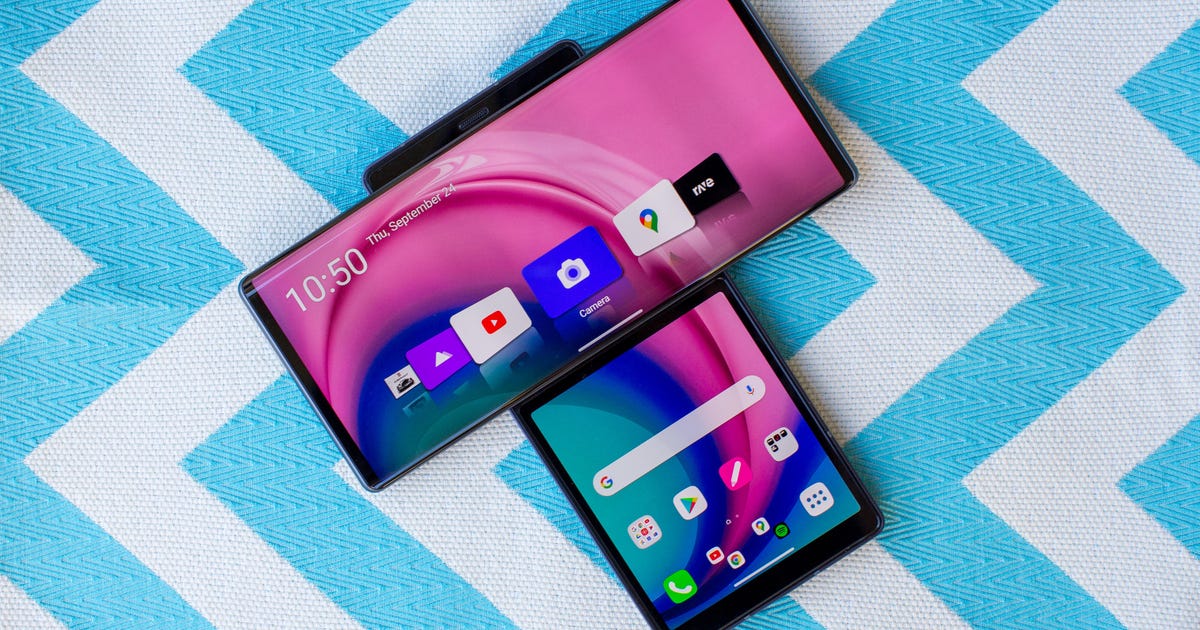
These days, phones are either rectangular slabs with one straight screen or, in the case of the Galaxy Z Fold 2 or Motorola Razr 5G, they're slabs with flexible screens that open up. But the LG Wing is neither. Instead, it's a phone with two screens, one of which swivels on top of the other.
Yes, it's weird and yes, it's expensive at $1,000 on Verizon (UK and Australia pricing have not been released yet, but that converts to about £775 and AU$1,394). But the design isn't as crazy or pointless as it seems. After pushing through the initial learning curve, which does take some time, my experience with multitasking and recording video got a boost thanks to the Wing's unusual shape.
The LG Wing isn't for everybody, and LG knows this. Its bulkier design and potentially steep price will automatically lead to many people writing it off. Also, not all apps will accommodate the two screens. Nevertheless, I appreciate LG's willingness to try something different. Swivel phones aren't exactly new, even if they aren't around much anymore: The VX9400 from 2007, for instance, is an early example of an LG phone with a similar design, and I myself owned a beloved Nokia 7370, which featured a screen that swiveled out as smoothly as a switchblade comb. But LG has applied that design thoughtfully enough for this current era of phones.
Whether or not people are willing to pay to give its $1,000 vision a shot is the big question. While it's not impossible to sell an expensive handset amid a pandemic when everyone is more budget-conscious, as Samsung has shown with its Galaxy Note 20, it's certainly risky to do so. And LG's record of selling experimental phones isn't stellar. Its modular G5 from 2016 and curved G Flex from 2014 weren't exactly top sellers. But fitting "more screen in less space" is always appealing, and the LG Wing, at the very least, executes its own concept well.
In the US the LG Wing will be available first on Verizon, then AT&T in the fall and T-Mobile -- all on their respective 5G networks.
LG Wing design: Spin me right round
I spent time with a preproduction model and found that the LG Wing is a straightforward phone when it's closed. It has a 6.8-inch display, wireless charging and an in-screen fingerprint reader. But it's also missing a few things that other LG phones have. It doesn't have a headphone jack, which LG usually keeps, and it doesn't have a formal IP rating for water protection.
And while it's not as heavy and thick as the Galaxy Z Fold 2 when it's folded, the LG Wing is still thicker and heavier than regular phones. It's about a third thicker than most phones, not twice like I first assumed, because the top panel is thinner than the bottom.
The phone only opens in one direction, clockwise, so to open it single-handedly, it should be in the right hand. (I'm a left-hander and I thought mine was broken and stuck when I first tried to open it, but it wasn't.) The motion does require some carry-through with the thumb, and if I didn't slide it strong enough, the top display would stop short of clicking straight. But most of the time it rotated fine and the mechanism feels sturdy. While I didn't go buck wild trying to rip these two displays apart, I didn't feel like I needed to be any more careful with it than with any other premium phone. LG estimates that the phone is durable enough to survive 200,000 rotations over the course of five years. If you want more protection, LG is working on cases, but those will undoubtedly add more bulk.
The phone has a 6.8-inch display on top that rotates clockwise.
Angela Lang/CNET
LG Wing's 2 displays do double duty
Once the phone's open, you can do a variety of things in a variety of orientations. Multitasking is the most obvious benefit, like watching YouTube while looking up something on the web. If you're talking to a buddy over the phone and want to check your calendar to schedule a time to meet up, you can do that too. My favorite way to use it is having Maps display on the larger screen and music controls on the other one. This is especially useful in the car, when I want to skip tracks without fussing too much with the phone and taking my eyes off the road. Given the bulk of the Wing though, I suggest having a sturdy phone mount. When I found myself opening the same pair of apps often (Maps and Spotify, for instance), I paired them so they could launch quickly together.
The back of the phone when opened.
Angela Lang/CNET
When held upside down, the phone opens up different experiences for gameplay. I played the racing game Asphalt 9 this way, with the bigger screen displaying the main gameplay and the smaller one displaying a roadmap. I'm not convinced this was useful, though. Plus the phone is top-heavy when held upside down, so it was uncomfortable to hold the thinly edged display in my hands after a while.
Having two screens to navigate one app is interesting too. With messaging, for instance, I can view a large part of the conversation while texting. But as I mentioned before, not every app is optimized. For instance, I'd love to watch a YouTube video while reading comments on the other screen, but I couldn't do that on the phone. And if you don't want to use the bottom display much at all, it can be turned into either a trackpad to navigate the top display, or blacked out completely and used as a physical grip.
3 cameras and a gimbal
The Wing has three rear cameras: one standard camera and two ultra-wide cameras. One of the ultra-wide cameras has a gimbal inside, which is similar to the Vivo X50 Pro. Gimbals are used to stabilize and balance video even when you're moving around a lot. LG added a special Gimbal Mode with extra controls as well, so you can pan and follow your subject as they move.
My video footage was steady, even as I was recording while walking quickly. Video looked more stable than the one recorded on the iPhone XS, which we happened to have on hand, and footage from the LG Wing lacked that pulsing effect the iPhone had too. When it came to picture quality though, colors were more true-to-life and objects looked smoother on the iPhone. On the front is a 32-megapixel camera embedded inside the phone and popup from out of the top edge when in use, which is a lot like the OnePlus 7 Pro, Vivo Nex and Oppo Reno 2. The selfies I took were bright, in-focus and clear.
Videographers may be interested in the suite of tools the LG Wing has, and Gimbal Mode adds an extra layer of control and creativity. Gripping the phone vertically while shooting horizontally also made it comfortable to shoot video. But if you're a casual video-taker, this isn't a must-have, and current iPhones and Pixel phones have excellent video stabilization features too.
In bright, ample lighting the phone takes vibrant and clear pictures.
Lynn La/CNET
Another outdoor image taken on the LG Wing.
Lynn La/CNET
In this closeup shot, the flower petals on the foreground are in focus and sharp.
Lynn La/CNET
A photo taken with the phone's pop-up front-facing camera.
Lynn La/CNET
LG Wing's hardware and other specs
Powering the phone is a Snapdragon 765G chipset and a 4,000-mAh battery. Since I got a preproduction unit, I didn't conduct battery tests. Anecdotally though, the Wing had a decent battery life. With medium usage of both screens it was able to last a full day without charging.
LG Wing 5G specs
Display size, resolution
Main screen: 6.8-inch OLED; 2,460x1,080 pixels. Second screen: 3.9-inch OLED; 1,240x1,080 pixels
Tesla faces more lawsuits alleging sexual harassment at its Fremont factory
Tesla faces more lawsuits alleging sexual harassment at its Fremont factory
Tesla is facing lawsuits from six women accusing the company of "rampant" sexual harassment at its Fremont, California, factory. In separate suits filed on Tuesday, six current and former Tesla employees alleged they regularly faced catcalling, inappropriate touching, sexual comments and other harassment by colleagues and supervisors.
The new suits, which were earlier reported by The Washington Post, come after a Tesla worker in November filed a lawsuit alleging she was subjected to sexual harassment at the Fremont factory.
"Tesla has failed to take sexual harassment seriously, from the top of the company down," said attorney David Lowe, a partner at Rudy Exelrod Zieff & Lowe who represents the women, in a release. "Elon Musk tweeting a lewd comment about women's bodies or a taunt toward employees who report misconduct reflects an attitude at the top that enables the pattern of pervasive sexual harassment and retaliation at the heart of these cases."
Musk, the CEO of Tesla and SpaceX, on Tuesday also faced accusations from a former SpaceX engineer of fostering a culture of misogyny and abuse at the space company. The former employee said SpaceX ignored multiple incidents of alleged sexual harassment.
The new suits were filed in California Superior Court in Alameda County. Five of the employees work or worked at Tesla's Fremont factory and one worked in service centers throughout Southern California.
Tesla doesn't operate a public relations department to field requests for comment.
This story is part of War in Ukraine, CNET's coverage of events there and of the wider effects on the world.
It's been over a month since Russia invaded Ukraine, and worries about cybersecurity continue to grow. Even before the invasion, US officials blamed Russia for cyberattacks against some Ukrainian websites, including Ukraine's Ministry of Defense and two banks.
While the US Cybersecurity and Infrastructure Security Agency said there are no specific or credible cyberthreats against the US, the agency also said potential cyberattacks are more likely to target infrastructure. CISA is recommending everyone be prepared just in case. And securing your mobile device is a good place to start when building a line of cyberdefense. Here are six steps Android users can take to protect their phone data.
Make sure your OS is up to date
Updating your operating system can patch known security vulnerabilities and fix bugs. Not updating to the latest version leaves you and your device open to flaws that could expose personal data to malicious actors. Some people might put off updating their OS so they don't have to deal with early bugs in the system, but waiting too long can harm your system. Here's what to know about the latest Android OS, Android 12.
Turn on two-factor authentication
Two-factor authentication , or 2FA, adds a second layer of security to your Android account in case your password gets stolen. With 2FA, once you enter your password, a second message is sent to another device asking to verify that you are trying to login. It adds a bit more time to your login process, but the extra layer of security is well worth it. Here's how to turn on 2FA.
Use a password manager
If you're having trouble memorizing multiple passwords and coming up with unique passwords for every account, a password manager can help. These utilities can work hand-in-hand with 2FA and can securely store passwords and automatically fill login pages. They can also protect you against phishing scams that direct you to enter your password into a fraudulent website. For more information, check out CNET's reviews of password managers Bitwarden, LastPass and 1Password.
Encrypt your Android
Starting in 2015, Google required manufacturers to make Android devices encryptable out of the box. Once your device is encrypted, all data stored on the device is locked behind a PIN code, fingerprint, pattern or password known by the owner. Without that key, not even Google can unlock your device. Here you can find out how to encrypt your phone.
Remove your data from Google
Android is a Google product, so unencrypted device data could be stored on a Google server. You can check with Google to see what data of yours it has, and you can ask Google to delete that data. The process can take time, but it's worth the effort -- your data can't be stolen if it's not in the system to begin with. Here's where you can find how to request Google to delete your information, but note that Google does not guarantee that it will complete the request.
When all else fails, delete your phone
If you lose your phone or it's stolen, you can remotely wipe your phone. Our Android settings guide has a walkthrough in case you need to take this step. This gets rid of all data from your phone so if you have anything on it you want to keep, you should get in the habit of backing your phone up on a separate device.
For more information on securing your phone, check out these eight apps to protect your phone's privacy, what information digital security experts wish you knew and how to stop your phone from tracking you.
The 2.99-pound XPS 13 Developer Edition -- started as a project to create an open source developer laptop -- is now available on Dell's site for $1,549.
Those specifications, with the critical exception of the Ubuntu Linux, are identical to the 1080p XPS 13 for Windows 8.
Here are the specs:
Operating system: Ubuntu Linux 12.04 LTS
Display: 13.3-inch 1,920x1,080 panel
Processor: 3rd Generation Intel Core i7-3537U
Memory: 8GB2 DDR3 SDRAM at 1600MHz
Storage: 256GB solid-state drive
Graphics: Intel HD 4000
Price: $1,549
In addition to the U.S., Dell will also start to roll it out in select countries in Europe, including the UK, France, Germany, Austria, Belgium, Denmark, and Finland.
The XPS 13 is one of the better ultrabook designs to emerge from a top-tier PC vendor. It squeezes a 13.3-inch screen into a footprint more typical of 12-inch laptops, boasts Gorilla Glass, and is constructed from aluminum and carbon fiber, allowing Dell to keep the weight to just under three pounds.
The upgraded display is also brighter and has wider viewing angles than the original 1,366x768 XPS 13 model.