Portable Bluetooth Speakers

Huawei Mate 8 review: An overpriced battery life beast


Huawei Mate 8 review: An overpriced battery life beast

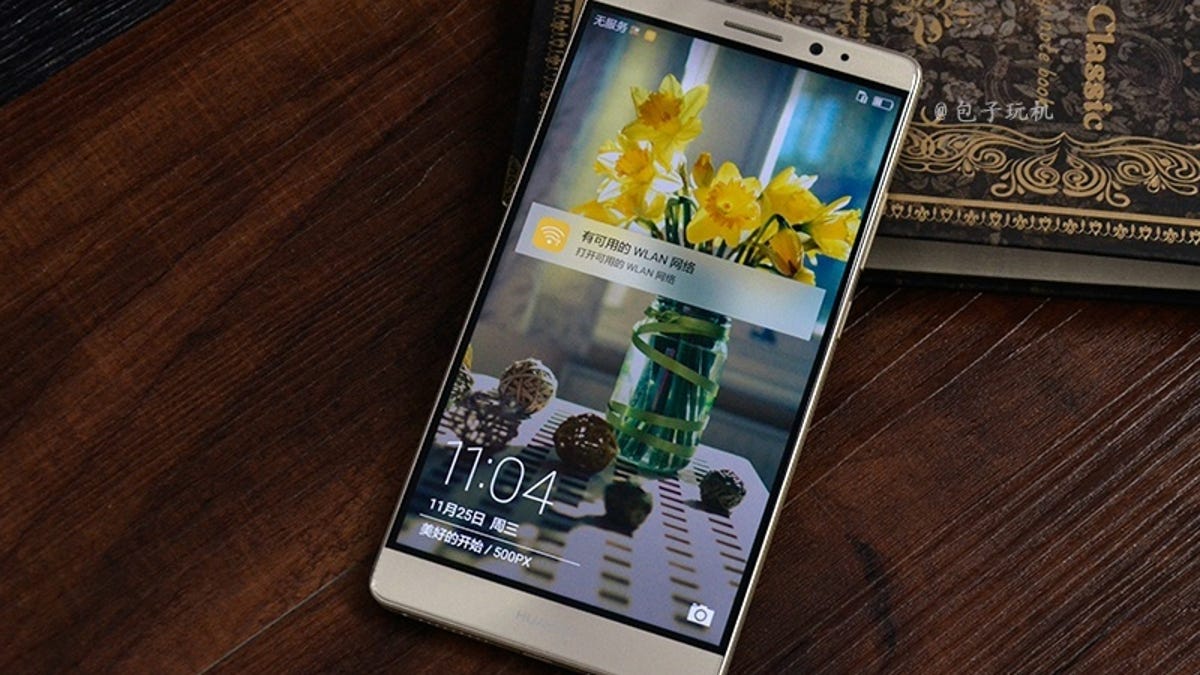
Huawei's all-metal, 6-inch Mate 8 has a lot going for it, especially its long-lasting battery and high camera quality. After all, those are two things almost anyone would look for in a phone. But unfortunately the handset's price tag is too steep to close the deal -- €600 for the 32GB version and €700 for the 64GB model. Those numbers translate to roughly $650 and $760; £450 and £525.

The Mate 8 isn't expected to come to the US.

The prices alone aren't the problem; they're in line with premium rivals. The problem is that the Mate 8 just isn't a premium phone, certainly not premium enough to best the Google Nexus 6P or Samsung Galaxy Note 5, two of the phones I would look at if you're thinking of going large (scroll to the end for a full specs comparison). Part of my recommendation to skip the Mate 8 stems from the other, admittedly minor drawbacks, including a screen resolution that's lower than I'd like on a phone of this size.

A much lower price would help blunt those flaws and give fans of big phones a good alternative in an all-metal build. However, if you can get the Nexus 6P or Galaxy Note 5, or even the LG V10, do that instead. You'll get more for your hard-earned cash.

Pros:

  • Long-lasting battery
  • Recent version of Google's software, Android 6.0
  • All-metal build
  • Same accurate fingerprint reader that's on the back of the Huawei-made Google Nexus 6P
  • Loud speaker audio

Cons:

  • Large size is polarizing and won't fit comfortably in all hands
  • Dim screen
  • Screen resolution is too low

Battery life and screen size set the Mate 8 apart, but...

If you're hot on big phones, the Mate 8's 6-inch screen gives you the room you need to run wild. When I hold the Mate 8 in my hand, the screen seems bright and wonderful...until I stream video, view high-res photos or hold it next to any other phone. It's then that I notice its 1,920x1,080-pixel resolution looks dimmer and a little hazier than other phones of its class at any brightness level, especially the impossibly vibrant Nexus 6P.

Compared to ultrasharp displays like on the Nexus 6P's 2,560x1,440-pixel resolution, higher-res graphics look less detailed; that's because there are fewer pixels on the Mate 8, much lower than you typically see on a large-screen phone (see chart below). Most of the time, the Mate 8's resolution won't impede your viewing pleasure, but Huawei really should have climbed to the next rung in resolution to match the well-priced Nexus 6P (2,560x1,440 pixels).

The battery lurking below this shiny exterior packs some real muscle.

Sarah Tew/CNET

Better news is that battery here is a monster -- the Mate 8 lasted an average of 15.6 hours in our video drain tests. In everyday life, too, I always seemed to have enough battery reserves after continuously using it throughout the day. Some of that is due to the dimmer screen, though if your battery ever does get perilously close to flatlining, you can always turn on the phone's power-saving settings.

Bonus points: Camera and Android 6.0

Photos were another bright spot. The 16-megapixel rear camera and 5-megapixel front-facing camera shot off rounds of very nice photos in most lighting settings, indoor and out. I'm not saying these were flawless -- camera photos do have their limits and I did get some weirdly yellow indoor shots in seriously terrible lighting -- but the camera components have gotten so good lately that most higher-end models will take photos you like.

Selfie shots were also pretty good when tested in the hand and yes, even on a selfie stick during a rowdy New Year's party, but Huawei does shove Beauty Mode down your throat -- unbelievably, you have your choice of two. Those with a more natural vibe can switch to the usual camera mode to slides settings down from Beauty 10 to zero.

The camera took pleasing photos in almost every lighting condition I threw its way.

Josh Miller/CNET

Here's another good thing: the Mate 8 has Android 6.0 Marshmallow onboard, Google's latest software. Being up to date means you get new features like Doze (automatic battery-saving software) and Now on Tap (which pops up extra info when you press the home button) -- I also like invoking Google voice search ("OK, Google") from any screen. The presence of Android 6.0 hopefully means that Huawei will continue to update the Mate 8 as Google rolls out updates.

If you've never used a Huawei phone before, you should know that Huawei liberally sauces Android with its own flavor, which it calls the Emotion UI (EMUI 4.0). It's a pretty dramatic change if you're used to the Nexus 6P's vanilla Android. Your apps lay out along multiple home screens like on the iPhone, and the lock screen and notifications pull-down menu have different effects, too. Spend some time playing around with the settings menu and lock screen and you'll get it all how you want it. I personally like some of the animated transitions, but a lot of Android purists I know rail against any changes to their favorite Android skin.

The colors on this broad-leaf plant are vibrant without being oversaturated.

CNET

I photographed this venerable St. Bernard close to the stroke of midnight on New Year's Eve.

Jessica Dolcourt/CNET

These friends took the Huawei Mate 8's selfie capabilities into their own hands -- er, their own selfie stick.

CNET

Our standard studio shot, taken in controlled lighting with the Mate 8.

James Martin/CNET

Things I'm not sold on

I've already mentioned that screen resolution is lower than I expect for a premium-priced handset. The Mate 8's processor and overall dimensions also raise some red flags.

The processor

Huawei doesn't just make gadgets, it now makes processors, too. Like Samsung, Huawei started using its Kirin chipset in phones. The Mate 8 did fine in our diagnostic tests, but generally lagged behind top phones from Samsung and Apple. More worrisome, Riptide GP2, which I regularly use to test smartphones, crashed the six or seven times I tried to push the limits in graphics settings (it played on medium-level graphics, though). On the other hand, those crashes could have more to do with how the developers coded the app; the phone behaved fine. Everyday tasks like opening apps and uploading photos worked smoothly and seamlessly, and bootup time was on par.

Huawei Mate 8 performance

Huawei Mate 8 (32GB) 17,883 1,736 6,214 Google Nexus 6P 24,224 1,286 4,313 Apple iPhone 6S Plus 28,080 2,403 4,240 Samsung Galaxy Note 5 24,589 1,488 4,939
  • 3DMark Score (Ice Storm Unlimited)
  • Geekbench 3 Score (Single-Core)
  • Geekbench 3 Score (Multi-Core)
Note: Longer bars indicate better performance

The size

For me, the Mate 8's dimensions are just too big. The handset is hefty and wide, and even though there's a setting for one-handed controls, I'd never use them. The fingerprint sensor on the back that you can use to unlock the phone is dead on when you position your finger correctly, but I had to stretch to reach the sensor on the Mate 8 just as I did on the Nexus 6P, so I couldn't always unlock the phone the first time around. The larger-pawed folks I handed didn't have my problems.

Interestingly, the Mate 8 and Nexus 6P have about the same body dimensions, even though the 6P's screen is slightly smaller. If the 6P isn't too large for your hand, the Mate 8 won't be either.

Versus the Nexus 6P and others

With that premium-phone pricing and under-premium specs, the Mate 8 just isn't worth your money. Pick the Nexus 6P or Galaxy Note 5 instead. Although both are equally large in the hand, you'll enjoy a sharper, brighter screen and top-notch camera. Nexus 6P owners also get to brag about the perks of owning Android 6.0's debut phone, like getting new updates first and little things like a camera quick-start trigger.

Huawei Mate 8 specs versus rivals

Huawei Mate 8 Google Nexus 6P Apple iPhone 6S Plus Samsung Galaxy Note 5
Display size, resolution 6-inch; 1,920 x 1,080 pixels 5.7-inch; 2,560x1,440 pixels 5.5-inch; 1,920 x 1,080 pixels 5.7-inch; 2,560x1,440 pixels
Pixel density 368ppi 515ppi 401ppi 518ppi
Dimensions (Inches) 6.2 x 3.2 x 0.31 in 6.3 x 3.1 x 0.28 in 6.2 x 3.1 x 0.29 in 6 x 3 x 0.3 in
Dimensions (Millimeters) 157 x 81 x 7.9 mm 159 x 78 x 7.3 mm 158 x 78 x 7.3 mm 153 x 76 x 7.6 mm
Weight (Ounces, Grams) 6.5 oz; 185 g 6.3 oz; 178 g 6.8 oz; 192 g 6 oz; 171 g
Mobile software Android 6.0 Marshmallow Android 6.0 Marshmallow Apple iOS 9 Android 5.1 Lollipop
Camera 16-megapixel 12.3-megapixel 12-megapixel 16-megapixel
Front-facing camera 8-megapixel 8-megapixel 5-megapixel 5-megapixel
Video capture 1080p HD 4K 4K 4K
Processor 2.3 GHz eight-core Huawei Kirin 950 2.0 GHz eight-core Qualcomm Snapgradon 810 Apple A9 chip (64-bit) Samsung eight-core Exynos 7 Octa 7420
Storage 32GB, 64GB 32GB, 64GB, 128GB 16GB, 64GB, 128GB 32GB, 64GB
RAM 3GB, 4GB 3GB 2GB 4GB
Expandable storage Up to 128GB None None None
Battery 4,000mAh (nonremovable) 3,450mAh (nonremovable) 2,750mAh (nonremovable) 3,000mAh (nonremovable)
Fingerprint sensor Back cover Back cover Home button Home button
Special features Dual-SIM Pure Android N/A S Pen stylus
Price off-contract (USD) ~$650 (32GB); $760 (64GB) $500 (32GB); $550 (64GB); $650 (128GB) $750 (16GB); $850 (64GB); $950 (128GB) $670-$740 (32GB); $770-$840 (64GB)
Price (GBP) ~£450 (32GB); £525 (64GB) £450 (32GB); £500 (64GB); £580 (128GB) £620 (16GB); £700 (64GB); £790 (128GB) Not sold
Price (AUD) AU$899 (32GB only) AU$900 (32GB); AU$1,000 (64GB); AU$1,100 (128GB) AU$1,230 (16GB); AU$1,380 (64GB); AU$1,530 (128GB) AU$1,100 (32GB)

Source

Tags:


Asus pushes patch after hackers used updates to send malware


Asus pushes patch after hackers used updates to send malware

Thousands of Asus computers were infected with malware from the company's own update tool, researchers from Kaspersky Lab said Monday.

The researchers discovered the attack in January, after hackers took over the Asus Live Update Utility to quietly install malware on devices. The hack was first reported by Motherboard.

On Tuesday, Asus said it's fixed the vulnerability in the latest version of its Live Update tool, meaning you'll have to trust the software to resolve the issue.

"Asus customer service has been reaching out to affected users and providing assistance to ensure that the security risks are removed," the company said in a statement.

The hack, which Kaspersky Lab is calling Operation ShadowHammer, went on between June and November 2018. Kaspersky Lab found that it affected more than 57,000 people using its products. The Russia-based cybersecurity company was only able to find those numbers for its own users, and estimates that the malware could affect more than a million Asus owners worldwide. 

Symantec, another cybersecurity company, found the same malware from Asus updates, and cited at least 13,000 computers affected by the attack. The company said that 80 percent of victims were consumers, while 20 percent were organizations.

The update tool is preinstalled on the majority of new Asus devices.

The attackers were able to infect devices without raising red flags because they used Asus' legitimate security certificate, which was hosted on the computer manufacturer's servers.

Asus is a Taiwan-based computer company, and one of the top consumer notebook vendors in the world, with millions of laptops worldwide. 

"The selected vendors are extremely attractive targets for APT [advanced persistent threat] groups that might want to take advantage of their vast customer base," Vitaly Kamluk, director of Kaspersky Lab's Global Research and Analysis Team, said in a statement.

Malware can arrive on your devices in a lot of ways -- downloading a file from an email, opening a PDF you shouldn't have or via browser-based attacks.

The hack on Asus' automatic update tool points to another kind of concern, in which people have to be worried about patches from the source itself as hackers seek to exploit a trusted relationship. Supply chain attacks are not new: In 2017, the popular software tool CCleaner was hijacked to install malware on millions of computers.

Distrust in automatic updates leads to another kind of threat, as many companies often rely on people to patch their devices to defend against new malware. The majority of computers infected with the WannaCry ransomware, for instance, were hit because they didn't install a security update issued in 2017.  

While it's capable of attacking millions, the malware had a specific set of targets, researchers found. Once it was installed, the backdoor checked the device's MAC address. If it matched one of the hacker's targets, it then installed another set of malware, researchers said.

Kaspersky Lab researchers said they identified more than 600 MAC addresses, and released a tool for people to check whether they were targeted by the attack. The cybersecurity company said it's notified Asus, and the investigation is ongoing.

Originally published March 25 at 7:16 a.m. PT.
Updated March 26 at 6:26 a.m. PT: Includes response from Asus.


Source

Tags:


Here's How to Save $15 on the New Google Pixel Buds Pro at Launch


Here's How to Save $15 on the New Google Pixel Buds Pro at Launch

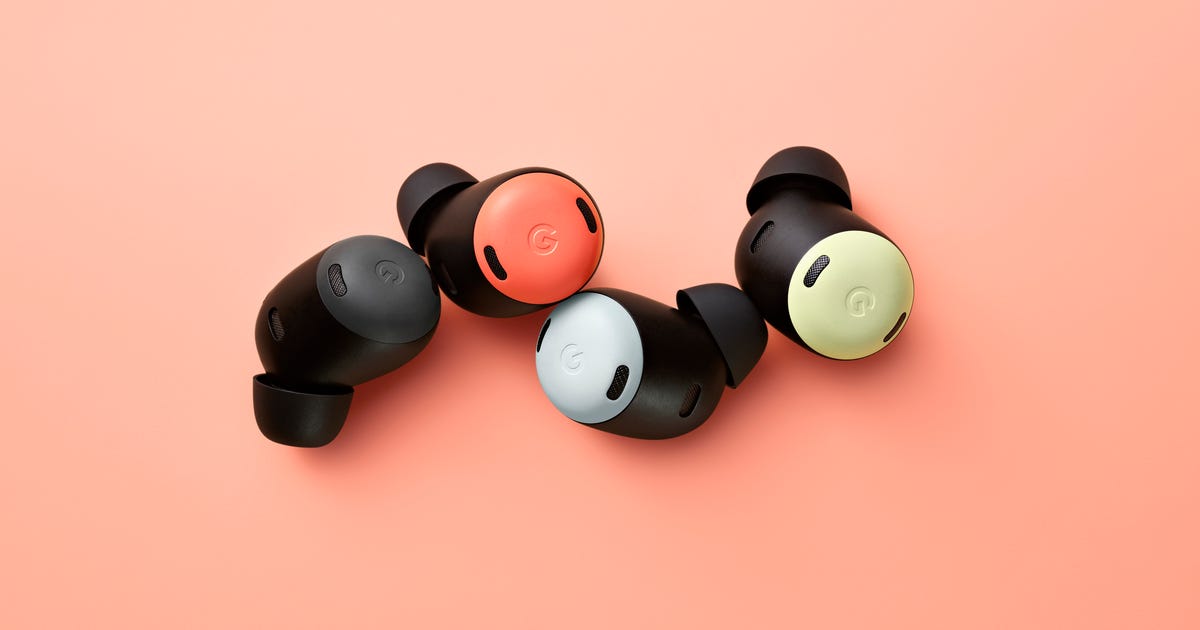
Announced in May at Google's I/O developer conference, the new Google Pixel Buds Pro wireless earbuds are now available to preorder. Retailing for $200 and taking aim squarely at Apple's AirPods Pro, these are Google's first active noise-canceling earbuds and you can score a set of Pixel Buds Pro at a discount before they even launch right now via Wellbots. When placing your preorder there, simply use coupon code CNET15 for an instant $15 price cut, dropping your new earbuds down to only $185.

Google put emphasis on the active noise cancellation performance of the Pixel Buds Pro at I/O (video), touting its Silent Seal technology designed to provide a tight seal for blocking out outside sound while avoiding that feeling of built-up pressure. When you need to let outside noises back in, the Pixel Buds Pro's transparency mode allows you to do just that without removing the earbuds.

Other neat features include support for multipoint Bluetooth connections, IPX4 water resistance, Qi wireless charging support and up to 31 hours of listening time(that includes the capacity of the charging case). Unlike Apple's AirPods earbud lineup, Google's Pixel Buds Pro are available in multiple colors, namely charcoal, fog, coral and lemongrass, for a little added personality.

Google Pixel Buds Pro preorders are slated to start shipping on July 26 and shipping at Wellbots is free.


Source

Tags:


Acer's Next AMD-Powered Chromebook Spin 514 Promises Next-Level Multitasking, Battery Life


Acer's Next AMD-Powered Chromebook Spin 514 Promises Next-Level Multitasking, Battery Life

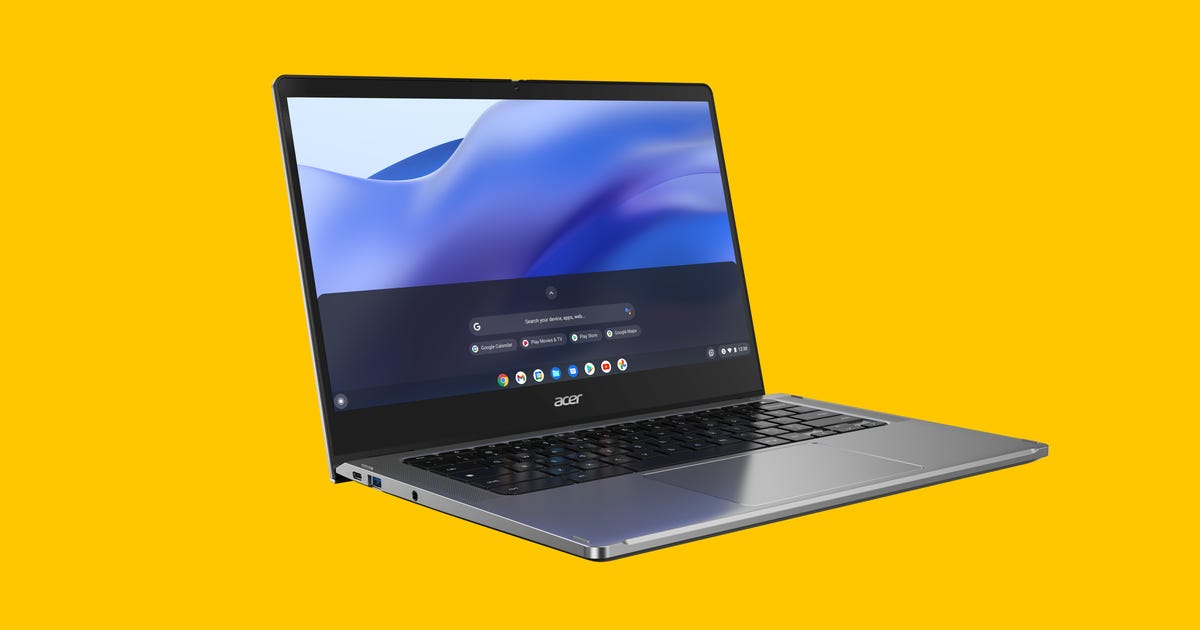
The current version of Acer's AMD-based Chromebook Spin 514 is good but there's definitely room for improvement. In fact, for a recently released Intel-powered version of the 14-inch convertible Chromebook, Acer overhauled it with 11th-gen Intel processors and upgrades. Those upgrades include a 1080p webcam, dual mics and stereo speakers flanking the keyboard. Dual USB-C ports, Wi-Fi 6, a backlit keyboard, a Gorilla Glass touchpad and a reinforced aluminum body make it a better choice for work and school. 

Now, Acer is taking the updated Spin 514 and dropping in the world's first eight-core x86 processors for Chromebooks, the AMD Ryzen 5000 C series. Using its Zen 3 architecture, the chips promise improved multitasking and leading productivity performance, up to 13 hours of battery life and improved integrated graphics including support for up to three 4K monitors, AMD said in its announcement. 

Acer Chromebook Spin 514, shot from the back
Acer

The Acer Chromebook Spin 514 base model will feature the AMD Ryzen 3 5125C, 8GB of dual-channel RAM and a 128GB PCIe Gen 3 NVMe SSD for $580 when it's available in the third quarter of 2022. (That price converts to roughly £460 or AU$800.) Configurations will be available with up to the top-of-the-line Ryzen 7 5825C processor, up to 16GB of memory and up to a 256GB SSD. 

The features found on the Intel version will also be part of the AMD configurations including the full-HD webcam with a privacy shutter, Wi-Fi 6, a backlit keyboard and a 1080p display with 100% sRGB color space. 

An enterprise version of the Chromebook Spin 514 with AMD inside will also be available starting at $900.


Source

Tags:


Keep Fruits and Vegetables Fresh Longer: Tips That Actually Work, According to Experts


Keep Fruits and Vegetables Fresh Longer: Tips That Actually Work, According to Experts

This story is part of Home Tips, CNET's collection of practical advice for getting the most out of your home, inside and out.

Summer is a great time to take advantage of the many fruits and vegetables that are in season (and relatively cheap). The problem is when too much time passes by and the strawberries and spinach you intended on eating go bad. There have been plenty of times when I've had berries sitting in the fridge and found them spoiled within the week. The good news is there are ways to combat this issue by taking a few steps before storing produce in the fridge.

CNET Home Tips logo

With the help of some chefs, educators and other experts, we've come up with tips to keep your favorite fruits and vegetables fresh for as long as possible. You can also check out our tips on whether or not it's cheaper to buy a meal kit compared to grocery shopping, and how to get that organized TikTok fridge look.

Read more:  Best Refrigerator for 2022

herbs and vegetables in fridge

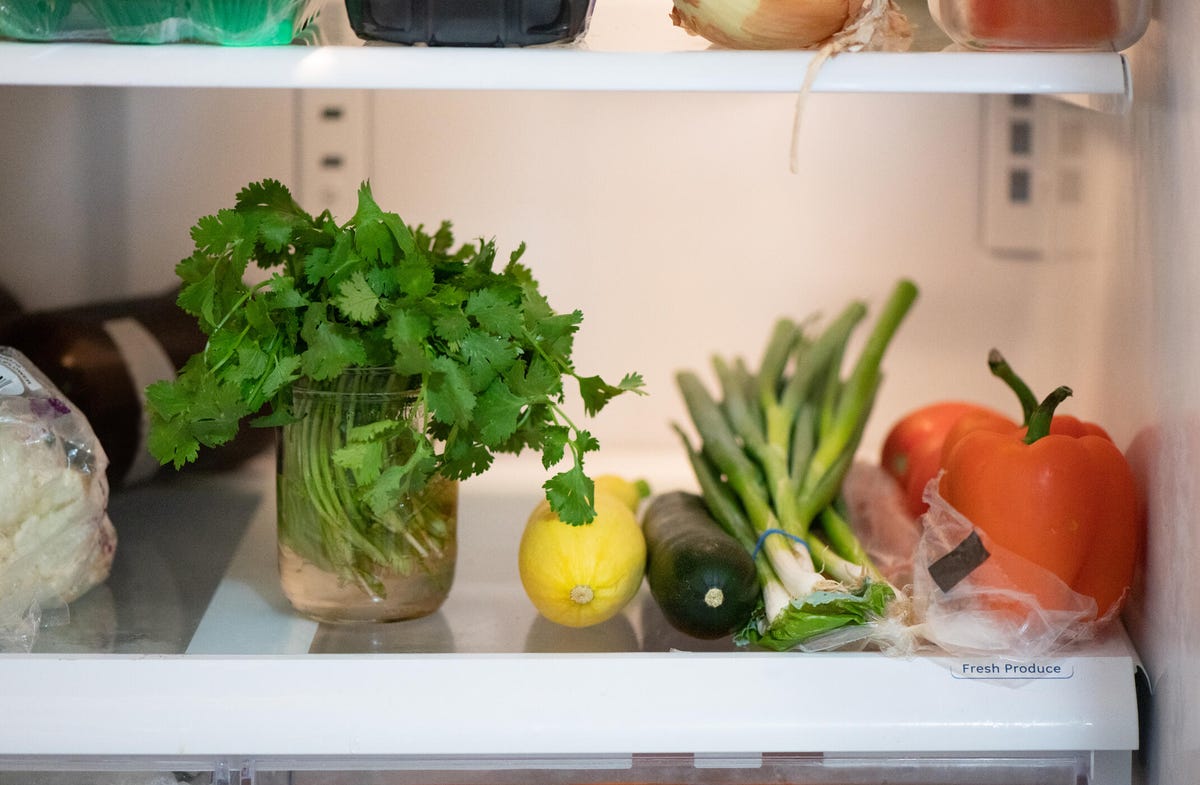
A good way to keep herbs fresh is by trimming the bottom stems and placing them in water.

Boogich/Getty Images

How to keep herbs fresh

If you like making your dishes with fresh herbs like parsley and cilantro, you know that a bunch can go bad if you don't use it all at once. Experts recommend a couple of different methods to keep herbs fresh as long as possible. You can trim the bottom stems, and place them in water in the fridge, according to Kelsey Riley, founder of vegan recipe site Planted in the Kitchen -- so long as you remember to change the water daily. 

Another option is to wrap herbs in a damp paper towel and seal them in an airtight bag, says Christina Bailey, a private chef and culinary instructor for cooking class provider Cozymeal. Olivia Roszkowski, chef instructor of Health-Supportive Culinary Arts at the Institute of Culinary Education, advises wrapping a damp towel around fresh herbs to preserve them longer. "This helps prevent wilting while soaking up excess moisture that can cause rot," she says. 

green fruits and vegetables in fridge

Store leafy greens in a dry environment in your fridge. 

AnjelaGr/Getty Images

How to keep leafy greens and root vegetables fresh

Keeping leafy greens such as spinach, kale and lettuce fresh require making the refrigerator environment as dry as possible. Extra lettuce will last longer if you place layers of paper towels between the lettuce leaves and seal it with plastic wrap. "The paper towels will retain the moisture as it comes out, and this can prevent lettuce from wilting as fast, but make sure to swap out the paper towels when they get damp," says Jen Stark, founder of gardening and home improvement blog Happy DIY Home. You should also remove any spoiled leaves in salad mixes to prevent bacteria from spreading across the rest of the produce, Roszkowski says.

Bailey also swears by wrapping dark leafy greens like kale in damp paper towels to help them last longer. She takes the same approach with root vegetables such as celery, carrots and parsnips. "If you have celery that has become floppy and lost its crunch, make a fresh cut at the very bottom of the stalks, and soak them in a bowl of cold water for a little while," she explains. "The stalks may not regain all of their original freshness, but the fibers can absorb some of the water and get a bit of texture back." 

To prevent carrots from drying out, Stark recommends chopping off the leafy green parts before you store them, and putting the carrots in a sealed container full of water before storing them in the fridge. "Carrot leaves pull nutrients from the roots, but once you cut them off and follow this process, fresh carrots can last between three and four weeks," she says.

berries at a farmer's market

To keep fruits fresh longer, you'll want to keep fruits with skins or peels separate from each other. 

Hanan Isachar/Getty Images

How to keep fruit fresh in the fridge

To keep those precious summer berries from going bad, you should store them in a container with small holes, on top of a paper towel. This prevents them from getting mushy and molding, according to Brittany Kline, a food preservation expert. 

To increase freshness, you'll want to keep fruits with skins or peels (like bananas and peaches) separate from each other, says Natalia Thompson, CEO and Recipe Creator at Flavorful Home. The reason is ethylene gas, a natural gas produced by most fruits and veggies as they ripen. "If you're keeping them in a fruit basket or a crisper drawer all together, chances are they contribute to the faster ripening of each other, making them spoil faster in the process," Thompson said. Additionally, she advises against keeping apples, bananas and tomatoes in particular close to each other because they are all heavy producers of ethylene gas.

Likewise, these fruits should not be placed with other produce like artichokes, broccoli, cabbage, cauliflower or lettuce. "These are sensitive to ethylene gas too, even when they don't produce the gas themselves," says Thompson. However, if your fruits ripen sooner than anticipated, you can freeze certain ones, such as avocado, bananas, berries, pineapple or mango for later use. 

inside of empty fridge

Make sure the fridge temperature is set accurately. This will also help your produce last longer.

djgunner/Getty Images

One last tip: Check your fridge temperature

While all of these tips and tricks will help keep your produce fresh for longer, they ultimately rely on one thing: your refrigerator. That means you want to make sure your temperature is set correctly and is accurate. The best way to check your fridge's temperature is by using a candy or bulb-style thermometer and then adjusting the dial in your fridge accordingly (learn more about how to test your fridge's temperature here). If the temperature isn't cooperating after a few times of troubleshooting, it may be time to replace your fridge (check out CNET's top refrigerator picks). 

Once you verify that your fridge is in good working order, you want to make sure you're storing your produce in the right place. Most fridges have drawers that are specified for fruits or veggies, based on the needs of that produce -- don't ignore them. 

As always, it's best to buy your fruits and vegetables in season, and to use them sooner rather than later. But if you want to prolong their life, these tips and techniques can help you do so, ultimately saving you money. For more, check out the cooking tip that will save you money on your utility bill, and how to save $100 a year by unplugging your appliances.


Source

Tags:


AMD Radeon RX 6800 XT and 6900 GPUs target 4K gaming, start at $579


AMD Radeon RX 6800 XT and 6900 GPUs target 4K gaming, start at $579

For the first time, AMD aggressively targets 4K gaming with its top-end PC graphics cards, the Radeon RX 6800, 6800 XT and 6900 XT; the company has typically stuck to the middle and lower end of the spectrum, with its previous-generation RX 5700 XT designed for 1440p play. All the new cards incorporate the RDNA 2.0  architecture that's in its GPUs for the upcoming Xbox Series X and S and PS5consoles and directly take on the new Ampere-architecture GeForce RTX 3090, 3080 and 3070 recently launched by Nvidia. The difference -- and the caveat -- this go-round is that the GPUs have been optimized s o that they achieve peak performance when used in conjunction with the company's new Ryzen 5000 series of desktop CPUs.

Specifications

AMD Radeon RX 6800 AMD Radeon RX 6800 XT AMD Radeon RX 6900 XT
Memory 16GB DDR6 16GB DDR6 16GB DDR6
Memory bandwidth 512GBps 512GBps 512GBps
Memory clock (GHz) n/a n/a n/a
GPU clock (base/boost) 1.815GHz/2.105GHz 2.015GHz/2.25GHz 2.015GHz/2.25GHz
Memory data rate/Interface 16Gbps/256-bit 16Gbps/256-bit 16Gbps/256-bit
Texture fill rate (gigatexels per second) 505.2 648 720
Ray accelerators 60 72 80
Stream cores 3,840 4,608 5,120
Texture mapping units 240 288 320
Compute units 60 72 80
TGP/min PSU 250/650 watts 300/750 watts 300/850 watts
Bus PCIe 4.0 x 16 PCIe 4.0 x 16 PCIe 4.0 x 16
Size 2 slots; 10.5 in/267mm long 2.5 slots; 10.5 in/267mm long 2.5 slots; 10.5 in/267mm long
Price $579 $649 $999
Availability Nov. 18 Nov. 18 Dec. 8

Hardware performance improvements stem partly from the higher-density on-die Infinity Cache design (all have 128MB) and enhanced design of the compute units (including a new Ray Accelerator core for each compute unit), which combine to improve the memory subsystem by reducing the latency of moving data around, increase bandwidth by up to 2.2x with a narrower path (256 bits) and deliver better energy efficiency. That also allows the processors to hit higher clock frequencies without a substantial increase in power requirements. A new Rage Mode in AMD's driver toggles one-click overclocking.

RDNA 2's deliberately cross-platform (meaning console and PC) design allows the cards to support the same next-gen capabilities on PC and Xbox, such as ray-tracing-related programming calls for faster and improved lighting-related rendering like shadows and reflections, since both Windows and the new Xboxes essentially use the same DirectX 12 Ultimate programming interface and AMD's own FidelityFX toolset. It also enables support for Microsoft'sDirectStorage programming interface, which accelerates SSD access by circumventing the CPU  to improve storage-intensive game tasks like load times.

AMD has numbers showing comparable performance between the RX 6900 XT and GeForce RTX 3090 -- a card significantly more expensive and power-hungry -- but there's a big caveat: They're run using the cards' new Smart Access Memory. SAM basically gives the card direct access to main system memory, but only when configured in a system with one of the new Ryzen 5000 series CPUs. AMD claims that SAM combined with Rage Mode boosts frame rates by up to 13%, which means performance on Intel systems or upgraded systems won't be as good. 

It will probably still be good enough given the price, power requirement and size differentials between the cards, though Nvidia's have better specs at every price -- or at least at the suggested prices. We'll only know once the games begin. As usual, there are likely to be some lower-end models in the queue, unless AMD decides to leave its $400-ish RX 5700 XT-based and lower cards on the market to feed the need for inexpensive 1080p and 1440p gaming, and hopefully they'll appear in time for holiday shopping.


Source

Tags:


Texas Sues Facebook Over Its Use of Facial Recognition


Texas Sues Facebook Over Its Use of Facial Recognition

Texas is suing Meta, the parent company of Facebook, over the social network's past use of facial recognition technology. The suit, filed Monday by Texas Attorney General Ken Paxton, accuses Facebook of violating the state's privacy laws by capturing biometric data on tens of millions of Texans without properly obtaining consent. 

"Facebook will no longer take advantage of people and their children with the intent to turn a profit at the expense of one's safety and well-being," said Paxton in a release. "This is yet another example of Big Tech's deceitful business practices and it must stop."

Facial recognition technology, which converts face scans into identifiable data, has become a growing privacy and civil rights concern. In November, Facebook said it would shut down its facial recognition system and delete the face scan data of more than 1 billion users. The company said the decision was spurred by societal concerns and regulatory uncertainty about facial recognition technology. 

The move marked a major shift away from the controversial technology that Facebook incorporated into features such as giving people the option to receive automatic notifications when they appear in photos and videos posted by others, or suggesting tags by using scans of previously uploaded photos to match people in new shots. 

By the time Facebook announced it would shutter its facial recognition system, the company had secretly exploited Texans and their personal information for more than a decade, the lawsuit alleges. 

"Little did users know that when they answered the simple question of who was in the photograph, they were helping to teach Facebook's facial-recognition technology to better map and recognize human faces for the benefits of Facebook's commercial endeavors -- and to the detriment of users' and nonusers' personal safety and security," the lawsuit states. 

Facial recognition technology could be abused by stalkers and criminals to gather information about a target or locate their social media accounts, the lawsuit points out. Governments have also use the technology to surveil people, and the technology has a harder time identifying minorities.

This isn't the first time Facebook has been accused of violating a state's privacy law. 

In February 2021, Facebook settled a class action lawsuit involving its use of facial recognition technology in its photo-tagging feature for $650 million. The lawsuit alleged the scans were created without user consent and violated Illinois' Biometric Information Privacy Act.

The new lawsuit alleges that Facebook captured Texans' biometric data without consent "billions of times" and exposed their personal information "to other entities who further exploited it" without users' knowledge. An estimated 20.5 million Texans are on Facebook, according to the lawsuit. Texas will seek civil penalties in the "hundreds of billions of dollars," according to The Wall Street Journal, which earlier reported on the lawsuit. 

The lawsuit accuses the social media giant of violating a Texas biometric privacy law because the company didn't receive consent from both Facebook and Instagram users to capture facial data and failed to destroy biometric data in a "reasonable time." Called the Texas Capture of Use of Biometrics Identifier Act, the law states that an entity must destroy biometric data no later than a year after the purpose for capturing the information expires. The lawsuit also alleges that Facebook engaged in false, misleading or deceptive acts by failing to inform users about the biometric data collection, violating a state consumer protection law.

In an emailed statement Monday, a Meta spokesperson said that the "claims are without merit" and that the company will defend itself "vigorously."


Source

Tags:

Search This Blog

Menu Halaman Statis

close