Get an Echo Dot for $1 When Signing Up for Amazon Music Unlimited With Early Prime Deal
Get an Echo Dot for $1 When Signing Up for Amazon Music Unlimited With Early Prime Deal
Smart speakers can be a big help to have around the house. They offer a convenient way to perform tasks such as checking the weather, setting timers and alarms to keep you on schedule and streaming music, all completely hands-free. If you always have music playing throughout your house, Amazon has an offer you'll want to see.
The company's Prime Day sales bonanza won't kick off until July 12, but plenty of early Prime Day deals are already available. Right now, any new subscriber who signs up for a one month individual plan of Amazon Music Unlimited can get a third-gen Amazon Echo Dot smart speaker for just $1, saving you $29 compared to buying the speaker on its own. To get the discount, you must be a new Echo device customer, and buy both the speaker and subscription on a single order.
The third-gen Echo Dot, which was originally released in 2018, is no longer Amazon's most advanced smart speaker, but still offers many of the same features and functions as the newer fourth-gen Dot. You can use it to control other Alexa-enabled smart devices like lights or locks, set custom alarms and routines and stream music from tons of different services, including Amazon Music Unlimited.
Amazon Music Unlimited, which starts at $10 a month for the individual plan (or $9 if you're a Prime member), is one of our favorite music streaming services for 2022. You get access to over 90 million, many of which you can stream in high-res lossless quality, as well as millions of podcast episodes. You don't have to sit through any ads, and you can also download songs and albums so you can take them with you anywhere you go.
Don't need an Echo Dot? Amazon is also offering new subscribers four free months of Amazon Music Unlimited for a limited time.
IronX by DXG 5G9V HD action cam review: Good bang-for-your-buck action cam
IronX by DXG 5G9V HD action cam review: Good bang-for-your-buck action cam
DXG might not have the name recognition of GoPro or Sony, but it's no stranger to camcorders. The manufacturer has been around for more than 20 years as a camera OEM/ODM and basically specializes in making inexpensive camcorders with attention-grabbing specs for the money. And that's pretty much what it delivers with its first action cam, the IronX 5G9V HD.
For $250 (and you can actually find it for less than $200) you get a nice action cam setup that shoots at resolutions up to 1080p at 30 frames per second as well as 720p at 60fps, has built-in Wi-Fi, and comes with just about every accessory you'd need to start shooting out of the box.
Now, specs aren't everything, and its video, like that of other DXG camcorders we've tested in the past, won't blow you away. But if you're looking for a way to capture your adventures without investing a lot of money up front, this is a good way to go.
In the box Accessories are an easy way to add value with action cams, and DXG didn't skimp. For starters, you get a waterproof housing that's good down to nearly 200 feet (60 meters) with both closed and vented backs, so audio isn't always muffled when you're shooting out of the water. The housing's bottom has a T-tip adapter on it that slides onto the included T-tip swivel plate. This plate can be slid into the curved or flat adhesive mounts that are included for mounting and dismounting the camera (see the slideshow below to take a closer look).
Joshua Goldman/CNET
The T-tip adapter also has slots that you can feed a Velcro strap (included as well) through for attaching the camera to a vented helmet. There are antifog strips to help prevent, um, fogging when sealed up in the housing; Micro-USB and Micro-HDMI cables; a USB power adapter for charging the camera; a security tether; and a lens cap. And to top it all off, DXG includes a simple RF wrist remote that lets you start and stop recordings and take pictures.
If you're worried that because this isn't a GoPro there will be a shortage of mounts, don't be. DXG has several mounts that use the T-tip adapter (head, chest, handbar, rollbar, rail, and suction cup) as well as a 1/4-20-threaded adapter for tripod mounts and a T-tip connector that works with mounts for GoPro's housings.
Design and features The IronX is similar in design to a GoPro camera: a small box with a lens that requires a housing of some sort for mounting. It has an f2.6 15mm lens (35mm equivalent), which gives you an ultrawide 170 degree angle of view. The camera alone is fairly lightweight, with most of its heft coming from its removable rechargeable battery pack. The plastic body doesn't feel like it can take much abuse on its own, though, so you'll want to be careful handling it outside of its housing.
On the left side you'll find a Micro-USB port that's used for charging as well as transferring videos and photos off the camera. There's also a mic jack for use with an external mic (not included) for better audio than you'll get with the built-in mono mic. However, the included housing doesn't allow access to the jack, but DXG does sell a simple camera holder that gives you access while mounting the camera.
The camera's right side has a Mini-HDMI port for direct playback on an external display and a microSDHC card slot that supports cards up to 32GB. Given all that the camera does come with, it's a bit of a surprise that no memory card is included, which is really the only thing preventing the IronX from being ready to go out of the box.
The waterproof housing seems like it can take some abuse and stood up to me dropping it a couple times, including a short fall from a moving bike onto pavement. The neon yellow and orange accents make it look a bit like a toy, but at least it didn't perform like one.
Joshua Goldman/CNET
A highlight of the camera is its onboard OLED display. It's very bright and easy to read even in direct sun. The menu system is relatively simple to navigate, too, with only the two buttons on top of the camera. There's also a setting that lets you flip the display, so it's easier to read regardless of how the camera is mounted.
Diving further into the settings, you can set the camera to record at three resolutions: 1080p at 30fps, 960p at 30fps, and 720p at 60fps. Also, the camera supports dual-stream recording, which simultaneously saves your full-resolution video along with a low-res thumbnail version for playback on mobile devices and faster uploads.
Photos are shot at 5-megapixel resolution and can be taken one at a time, in a burst of 10, or as a time-lapse video, snapping shots at 1, 3, 5, 10, 30, or 60 seconds.
Joshua Goldman/CNET
The IronX also has built-in Wi-Fi. Download the free iOS or Android app and you can use it to connect directly to the camera so you can see just what you're shooting. It can be used to control the camera, too, including changing resolution settings. And, if you shoot something you want on your mobile device for viewing and sharing, you can use it to transfer them as well. The app works well, although switching between recording and playback required me to reconnect to the camera in between. (That's likely a bug that can be fixed, though.)
Lightroom on Apple's M1 Max Mac: Holy mackerel, this is fast
Lightroom on Apple's M1 Max Mac: Holy mackerel, this is fast
I didn't really need to upgrade to an M1 Max-powered MacBook Pro. After spending hours using Adobe's Lightroom photo editing and cataloging software, boy, am I glad I did.
The speed of the new MacBook Pro knocked my socks off. The battery life was similarly impressive. And it's great having an SD card reader back for importing photos and videos from my cameras.
The improvements, validated with by testing some common Lightroom chores that caused my older Intel-powered Mac to crawl, are thanks to Apple's new chip and Adobe optimization to take advantage of it. Apple is halfway through a two-year process of replacing Intel processors with its own M-series designs. The chips are beefier cousins to the A-series chips in Apple's iPhones and iPads.
If you're leery about the switch, come on in. The water's fine.
Among the advantages the M1 Max and its similar but less graphically powerful M1 Pro sibling deliver: built-in circuitry for artificial intelligence tasks, a unified memory architecture, and a beefy built-in graphics processing unit. The chips balance power with battery life by combining high-speed and high-efficiency cores, resulting in more hours of use per charge. The chips are made for Apple by Taiwan Semiconductor Manufacturing Co. (TSMC).
My photography labor of love
For the record, my new MacBook Pro sports 32GB of memory, a midrange configuration for the 16-inch models and twice what's in my two-year-old MacBook Pro using a six-core Intel Core i7 processor. The extra memory is a $400 addition, but I judged it worthwhile to accommodate photo and video editing plus my usual burden of a few dozen browser tabs. (Lightroom is happy to grab as much of that memory as it can.)
To be clear: I was trying to decide whether my upgrade was justified, not evaluate how the latest Intel-based machines measure up. So the speed tests are relevant to me and likely anyone else wondering whether to shell out $3,000 or more. But they aren't meant to be definitive.
From the moment I set up the machine, the performance boost was obvious. Loading websites, scrolling and unlocking with Touch ID were all noticeably faster. Everything was refreshingly snappy.
And for a collection of Lightroom tests I ran, clocking common operations by stopwatch, the speedup factor on a collection of tests I ran is between 2x and 5x.
My new MacBook Pro with Apple's M1 Max processor handily outpaced the two-year-old Intel-based machine on a variety of common computing chores in my Lightroom photo editing. Each result is the average of three tests I clocked with a stopwatch.
Stephen Shankland/CNET
The main reason I justified buying a $3,500 laptop, which came to $2,150 with a $1,350 rebate for trading in my previous Intel-powered machine, was because glowing reviews indicated the new MacBook Pro would be better at heavy-duty tasks like photo editing.
I take a lot of photos. My Lightroom catalog has more than 129,000 shots and my Flickr archive has upwards of 30,000. I use photography as a creative outlet, a journal of my family's life and a tool that encourages me to learn about everything from insects to architecture. I take a lot of photos for work: I've documented refugees, nudibranchs and close-up details of processors.
It's a labor of love, and I do mean labor. I usually take 30-megapixel photos in raw image formats with my Canon 5D Mark IV. I also shoot hundreds of raw photos with a Google Pixel and an Apple iPhone. I also try out new camera products like the 45-megapixel Canon R5 and the 151-megapixel Phase One IQ4. That means I have a lot of photos to manage, many of them in processor-taxing sizes.
Processing photos is a lot of work for computers. Turning raw photo data into a shot I can see on my screen is a constant computational bottleneck as the computer renders new photos or rerenders them with editing changes. I quickly max out my memory with editing tasks such as exposure adjustments and tonal changes. I often sit impatiently watching progress bars crawl along as I merge multiple photos into a single panorama or high dynamic range (HDR) image or increase photo size with Adobe's Super Resolution feature.
Lightroom on the M1 Max MacBook
So how much faster is the new machine? Way faster. I performed five tests of routine but taxing Lightroom actions, running them three times on each machine and taking the average time. That might not be statistically rigorous for a scientific study, but it did clearly show I wasn't imagining the speedup.
Merging six 30-megapixel shots into a panorama was 4.8x faster on the new MacBook Pro, taking an average of 14 seconds vs. 67 for the Intel machine. That was the biggest speedup in my tests. The smallest was merging three 30-megapixel shots into an HDR photo, which took 22 seconds on the Intel machine and 12 seconds on the M1 Max, a 1.9x speedup.
Lightroom still struggles to accommodate Phase One's enormous 151-megapixel raw files, but the new Mac handled it much better than my older machine. A panorama merge of two shots took an excruciating 109 seconds on the Intel Mac; it was 3.2x faster on the M1 Max MacBook Pro at 34 seconds. Interpreting the raw files to generate full-resolution previews -- the most common delay I experience in Lightroom -- was 2.5x faster on the new machine.
Adobe's Super Resolution, a machine learning tool that benefits from the M1 Max's AI accelerator module, was 2.4x faster on the M1 Max Mac, an average of 9 seconds compared with 22 on the Intel Mac.
Adobe has updated Lightroom to take advantage of the M1 chips' unified memory architecture, which offers a single pool of memory that the central processing cores and graphics processing cores both can take advantage of. That means data doesn't have to be laboriously copied back and forth to separate CPU and GPU memory regions, liberating programmers to use whichever core is fastest for a particular job. Adobe also taps into the M1's Neural Engine cores for AI acceleration, said Sharad Mangalick, Adobe's photo product manager.
Lightroom photo editors also should see "noticeable improvements" in speed and responsiveness when importing and exporting photos, scrolling through the photo library, editing, and merging shots into HDR and panorama images, Mangalick said.
Indeed, I found many tasks in Lightroom -- launching, scrolling, zooming, importing and exporting -- are snappier on the new machine. On a Thanksgiving excursion on which I shot a couple hundred photos, battery life was good enough that it wasn't until the third day that I had to plug in the new MacBook Pro.
A year has 525,600 minutes. Matt Suda spent 206,989 of them -- more than a third of last year -- listening to Spotify.
Suda was one of the earliest customers to get his hands on an invite-only release of Car Thing, Spotify's first-ever hardware device, which goes on sale Tuesday. Unlike him, you probably didn't spend more time streaming music than sleeping last year. But Spotify is betting that Suda and about 140 million of you have something in common: Your car doesn't have a fancy infotainment system to rival a Tesla's.
"I was just interested in seeing Spotify's take on actually building their own hardware," said Suda, a 26-year-old student in Houston, who drives a 2012 Honda. "I wasn't expecting a whole lot. But getting the device and using it -- you can understand more the problem they're going after."
Spotify's main listening location is the home, but the car is a close second, said Gustav Söderström, Spotify's chief research and development officer. He says Americans spent an "insane" 70 billion hours a year on the road pre-pandemic. But while roughly 50% to 70% of cars on US roads may be able to connect to a phone, they're not so fresh-off-the-line as to have an entertainment display that easily streams tunes and podcasts.
To Spotify, that meant drivers in roughly 140 million cars might stream Spotify more -- or start paying for it if they don't already -- if a device could replicate Apple's Car Play or Android Auto for them.
"Why would we do something ourselves here?" Söderström said. "If this already existed, we wouldn't have."
Enter Car Thing.
Sarah Tew/CNET
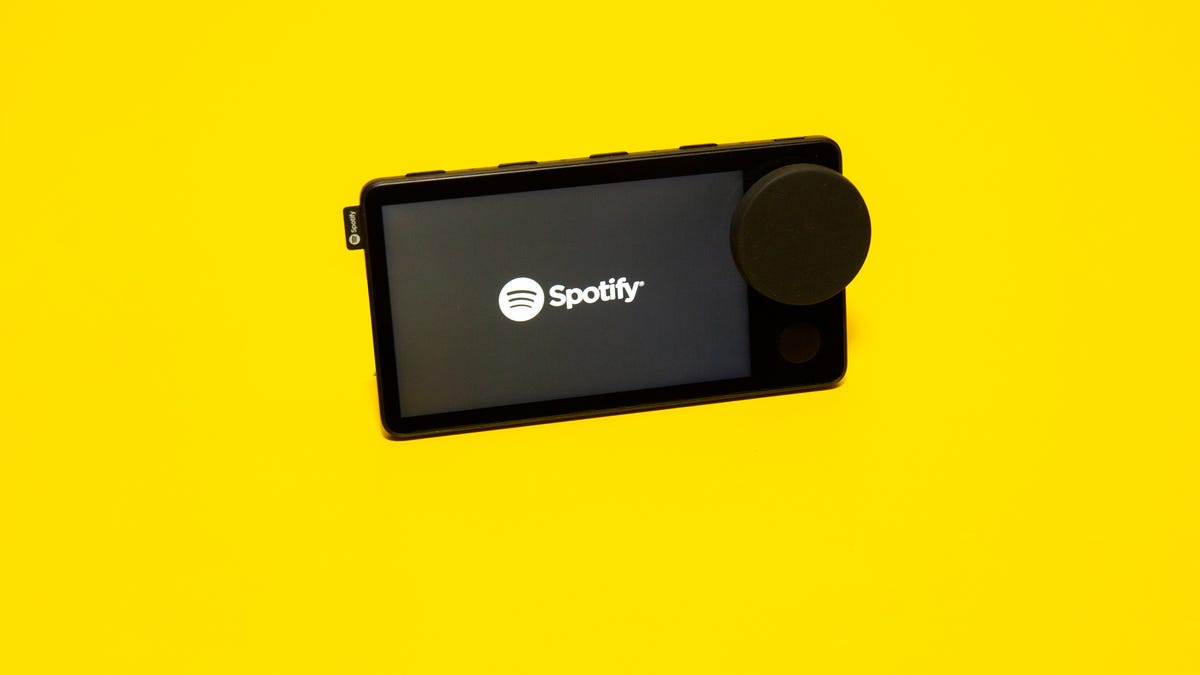
It may look like a bit like a sideways Zune, Microsoft's failed music player that launched in 2006. But with a credit-card-size touchscreen, mics to pick up voice commands, five buttons and a dial, the $90 Car Thing is a souped-up Spotify remote control for your ride. It mounts to your dash, with the goal of bringing a better way to safely stream music to drivers missing one of those fancy infotainment systems -- no dashboard teardown or new car required.
When Spotify first unveiled Car Thing in April, more than 2 million people signed up for its waitlist. The earliest people invited to try it got it free; by fall, people had to start paying $80. On Tuesday, it's finally going on sale in the US, with a $10 price hike to $90.
Currently, Car Thing works only with Spotify's premium tier. That means on top of the $90 you pay for the hardware, you also must pay for a Spotify membership. Its standard subscription is $10 a month, though it comes as cheap as $5 a month for students.
So Car Thing is only for Spotify -- but only for now.
Its software is on track for an update in "a few weeks" that will unlock it to control other audio apps, Söderström said. If you love Audible, Car Thing will be able to play, pause, skip and adjust volume for your audio books. The update will even allow Car Thing to work for services that are Spotify's direct competitors. "We want to be an open platform," he said.
That openness could, eventually, extend to "deeper integrations with potential partners" if Car Thing takes off, he added. While Spotify wouldn't elaborate on future partnerships, a Car Thing that could toggle between Spotify and Google Maps or Waze would give it the one-two punch of both music navigation and, well, literal navigation.
Broadening Car Thing may be wise, because those 140 million cars may be a more niche market than it seems, according to Tatiana Cirisano, a music industry analyst and consultant at researcher MIDiA. Just 22% of US consumers stream music in the car.
"Streaming services are battling for market share over this relatively small demographic," Cirisano said.
With sales opening in the US on Tuesday, Spotify is about to start learning: Is Car Thing tapping into a caravan of unmet need for millions of drivers? Or is it driving headlong toward a dead end?
But as vehicles steer toward a future of being more autonomous, anything Spotify can do to solidify itself as the must-have music service in the car may pay dividends down the road.
"Full autonomy is probably the most elusive goal of all, but the dream is: You get into your car and all the windows turn into displays," said Edward Sanchez, a senior automotive analyst at Strategy Analytics. "That's what everyone's salivating at the prospect of."
Sarah Tew/CNET
Getting to mile one
The concept for something like Car Thing had been percolating at Spotify for a while, but the device's date of conception might be marked in 2018, when it got its name. First proposed over dinner among a handful of Spotify hardware designers and brand agents, Car Thing was a semi-serious placeholder that the design team adopted for a code name. The name was funny, very literal and a bit childish, said Andreas Cedborg, Spotify's head of hardware product.
"People think, 'Hey, you can't name it like that,'" Cedborg said. "But, yeah, you can."
Hints about Spotify making hardware for the car soon trickled out. In 2018, some marketing materials made their way to a smattering of Spotify users, advertising a voice-command device you could mount on your dash and pay for as an add-on to your Spotify subscription. Images showed a round device with a lit-up text display with a green circle border. Spotify declined to comment on images at the time, but the company now says it was just a test; it never produced the device pictured.
By May 2019, Spotify came clean it was experimenting with a device called Car Thing. It was different from the device in the leaked test images, but it was also a long way from what Car Thing would become.
Spotify's first iteration of Car Thing.
Spotify
The first Car Thing's screen was too small, its dial too big, Cedborg said. Its green accents, a nod to Spotify's flagship color, made it stick out from the rest of the dashboard rather than blending in. It also had its own battery, which the current version eschews in favor of a cable that connects to your car's USB port or 12-volt socket. While a battery would make Car Thing more self-sufficient, freezing temperatures inside a car during winter would ding battery life, and scorching heat with a car baking in the sun risked explosion. A battery also adds weight, making it trickier to mount well.
The Car Thing team's eureka moment was combining a hat-trick of voice commands, touch screen and physical inputs like buttons and dials. Drivers needed all three, working in concert, they realized. A touchscreen is impossible for typing each letter of a song title while driving, but voice commands handle long titles easily. Yet voice commands are a frustrating way to get to the bottom of a long playlist; a physical dial makes that simple. This three-prong approach was "the user interface that we didn't see anywhere in the car world," Söderström said.
After three more years of testing, redesign, user research and pandemic delays, Car Thing was ready for its unveiling. In April, Spotify published a blog post that yes, Car Thing was real. Yes, Car Thing was the name. And yes, it had arrived -- sort of. Spotify introduced the waitlist, and people who signed up for it could potentially get it free.
The current design of Car Thing.
Sarah Tew/CNET
"We just can't make enough of them," CEO Daniel Ek said in October about getting Car Things into the hands of waitlisted customers. Progress was crimped by global chip shortages, a problem that halted carmakers' assembly lines, made Apple's iPhone 12 launch weeks late and turned finding a Sony's PS5 game console into a Christmas miracle. (Ek wasn't available to discuss Car Thing's US launch.)
But this slow seeding of the device allowed Spotify to gather feedback about Car Thing in the wild, figuring out what needed change or improvement.
Sarah Tew/CNET
Road ahead
The version of Car Thing on sale Tuesday is the same physical device purchased off the waitlist. What's changed is the software. And the price.
In pricing Car Thing at $90, Spotify is straddling two worlds. On one side, Car Thing isn't meant to be a revenue engine. Hardware "is a means to an end," Söderström said. Spotify hopes you'll pay for its service more so than its hardware. But on the other side, Spotify doesn't want to sell Car Thing at a loss just to make back the money on memberships. It wants to get Car Thing in as many cars as possible, but it will gauge Car Thing's success by the new subscribers and higher listening rates from existing members it attracts.
Despite the price hike, Spotify wants to get the price down. The $10 price increase was the result of the rising cost of chips, the company said. One thing that could help bring down price is selling Car Thing, eventually, outside the US, since scaling production can bring down the unit cost of making them. Spotify isn't committing to international expansion, but there are clear markets where Car Thing could go next, Söderström said, pointing theoretically to parts of Central and South America and Europe.
The company could also pursue bundles and deals that could make Car Thing a stronger value, he said.
Gustav Söderström is Spotify's chief research and development officer.
Spotify
Söderström likens Car Thing to the Kindle, Amazon's hit e-reader. As Amazon's play to keep Apple from dominating digital books, Kindle was a means to an end, too. When the Kindle first launched in 2007, it was $399. Today, coincidentally, Kindles start at $90, the same price as Car Thing.
Car Thing also comes at a time when Spotify's public image has been buffeted by drama over its most popular podcast, the Joe Rogan Experience. The debate pits accusations of dangerous COVID-19 misinformation against advocacy of freedom of speech. Spotify declined to comment on the Rogan debate.
Though 2 million on the Car Thing waitlist is a big number, it may have included flocks of people looking to score a freebie and a gaggle who were enticed by the hype around Spotify's first hardware. Sara Kayden, the marketing lead for Car Thing, says Spotify's conversion rate -- the amount people who actually buy Car Thing when they get off the waitlist -- was "healthy," without specifying further.
The buyer reaction to Car Thing so far runs the gamut. Social media is dotted with both raves and regrets by people who got one off the waitlist. One Redditor mounted Car Thing to his Harley Davidson motorcycle and paired it to his Bluetooth headphones. Before Car Thing, switching tracks or adjusting volume was "nearly impossible" with his phone in his pocket and leather gloves on.
But others have complained Car Thing was overpriced even when it was $80.
Suda, the Spotify power user who scored Car Thing early and free, is still using the gadget every time he drives, nine months later. He's noticed that Car Thing's software has gotten zippier. "To me, it just makes it easier to listen and it's actually safer, if you don't have CarPlay or any of that fancy stuff," he said.
In 2019, when Spotify revealed its first iteration of Car Thing, it also brought to light the possibility of a "Voice Thing" and "Home Thing." It was hardware that never materialized. Still, "it wasn't vaporware," Söderström said. "I've tried it. But it's not something we're launching right now." Spotify declined to comment on what its next thing in hardware would be. Regardless, they should definitely code-name it Next Thing.
And if Next Thing is ever to become a Real Thing, Spotify must pray Car Thing follows the roadmap of Kindle rather than Zune.
'Stranger Things 4': Let These Incredible TikToks Tide You Over Until Vol. 2
'Stranger Things 4': Let These Incredible TikToks Tide You Over Until Vol. 2
The final episodes of Stranger Things, season 4 arrive tonight! It's been a couple of weeks between volumes and with the wait just about over, maybe some shorter content will help plug the gap. Noah Schnapp and more cast members from Stranger Things have been providing the content we need to tide us over to the new episodes.
In a video posted on May 29, two days after Stranger Things season 4 premiered, Schnapp appears in full Byers garb -- a plaid shirt and khaki-colored pants he wears on the show -- and does an understated dance to a hip-hop track. "Will Byers making a TikTok?," the caption reads. You can check it out below.
@noahschnapp
Will byers making a tiktok?
♬ no idea X poke it out X out west - VNDRE
If you've scrolled through TikTok over the past month, you've probably taken note of the Stranger Things chatter. Season 4 has inspired everything from a TikTok challenge where people reveal which song would save them from Vecna's curse, to an auto-tuned version of Eddie's plea to a possessed Chrissy in the first episode ("Chrissy wake up," the track starts off. "I don't like this…").
Seventeen-year-old Schnapp and his Tiktok-savvy co-star, 20-year-old Caleb McLaughlin, are adding their own entertaining videos to the mix, and it's exactly what I've needed during this gap between season 4 episodes. Neither actor is new to the platform -- McLaughlin has been on since at least 2021 and Schnapp since at least 2019 -- but they've both delivered for fans during the show's interim.
In his follow-up TikTok to the Will Byers dancing vid, Schnapp pokes fun at TikTok's adoption of Kate Bush's Running Up That Hill, the 1985 song that saw a resurgence after the release of season 4. "Me scrolling on my For You page after May 27," appears on-screen, while he scrolls through numerous normal and sped-up versions of the song. In addition to the TikTok recognition, the track charted around the world.
Meanwhile, McLaughlin, the actor who plays Lucas, has spent the season 4 pause lip-syncing to Pass the Dutchie, another song highlighted in season 4, and introducing Stranger Things music-lover Max to his own 2022 single, Soul Travel. (McLaughlin, like several actors in the Stranger Things cast, is also a musician.)
All of these videos have individually crossed a million likes. So chances are I'm just recapping TikToks you've already seen. But if not, it's a fun way to spend some more time in the realm of Stranger Things. Schnapp has posted behind the scenes photos and videos of the cast, including some throwback pics from when they were all younger. McLaughlin's other videos also reveal how much fun the gang has together when TV cameras aren't rolling.
Netflix users watched 286.8 million hours of Stranger Things season 4 in its first three days -- more hours than the second season of Bridgerton. The second half of season 4 debuts in a little over a week, on July 1. If you want a mood boost while you wait, head to the accounts of these two creative cast members.
Bitmoji's Friendmoji are breaking out of Snapchat and onto your iPhones
Bitmoji's Friendmoji are breaking out of Snapchat and onto your iPhones
With Apple and Samsung wading into the crowded field of personalized emojis, Snapchat wants to expand too.
Friendmoji -- which are your Snapchat-customized Bitmoji featuring you and a friend -- will be available outside Snapchat on iPhones and iPads in the coming days, Snap said on Friday.
The cartoon versions of you and your friend will be available on the Bitmoji keyboard for Apple's iOS mobile software, allowing you to share your Bitmoji love through messages.
To share Friendmoji, your Snapchat account needs to be linked with your Bitmoji app. You can tap on the friend icon in the upper-right corner of the keyboard to select or search from your list of friends.
This comes as smartphone heavyweights Apple and Samsung make their own forays into the emoji battleground. On Monday, Apple introduced its Memoji, a cartoon version of you that's evolved from the previous Animoji lineup of animated poop and robots. Then there's Samsung's AR Emoji, which was introduced alongside the Galaxy S9 in February.
Special Reports: CNET's in-depth features in one place.
Culture: Your hub for everything from film and television to music, comics, toys and sports.
For its new small-business-focused ThinkBook S line, Lenovo has jettisoned much of the traditional ThinkPad baggage in favor of a consumer-friendly but relatively durable clamshell laptop design. The ThinkBook S comes with a subset of the security and support options that differentiate Lenovo's enterprise from its mainstream hardware. There's an extended warranty, better service and some of the company's ThinkShield features, plus a physical shutter over the camera.
Its prices are now more approachable: The ThinkBook 13s starts at $729, while the ThinkBook 14s starts at $749, and both will ship this month. We don't know pricing or availability for other regions, but those directly convert to approx £559 and AU$1,045 for the 13s and £575 and AU$1,075 for the 14s.
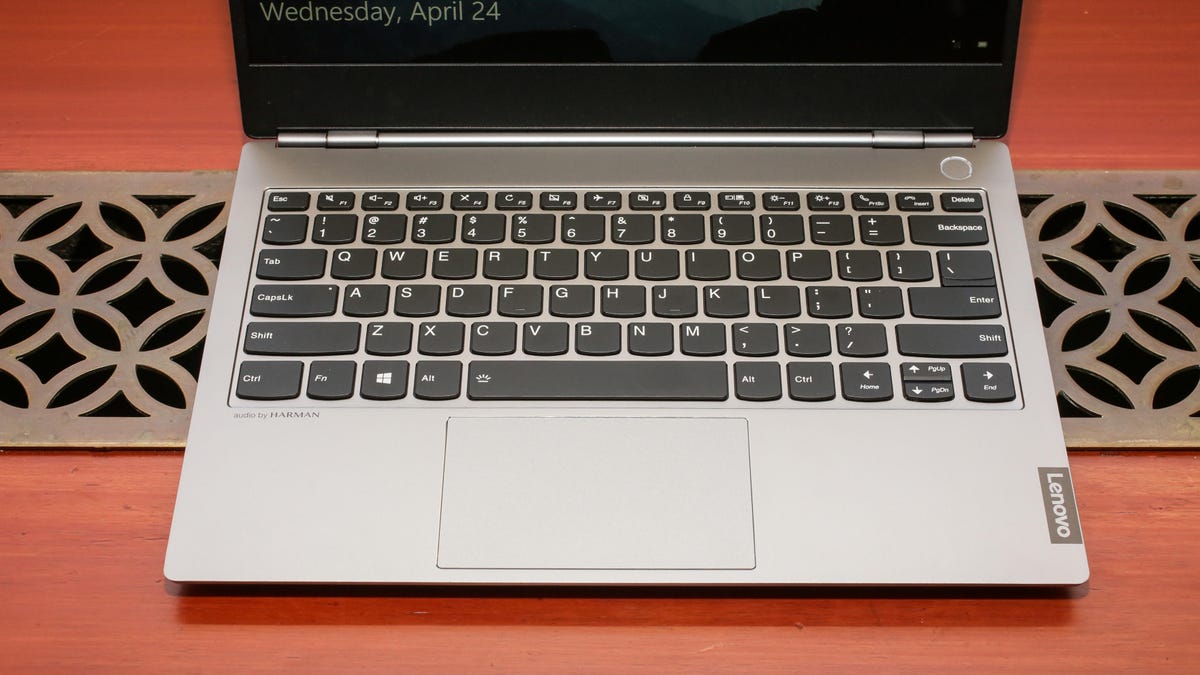
The ThinkBook doesn't have a typical ThinkPad keyboard.
Sarah Tew/CNET
The ThinkPad's carbon black exterior gives way to silvery aluminum for the ThinkBooks. And the ThinkBook breaks with the past in a way the ThinkPad can't without causing a riot: The keyboard has the same sculpted keys, but it puts the ctrl and fn keys in more familiar locations (they're swapped on the ThinkPad keyboard). It also has a mainstream touchpad instead of the TrackPad, and there's no Trackpoint stick.
Why two models in such similar sizes and prices? Variations in regional demands.
Comparative specifications
ThinkBook 13s
ThinkBook 14s
CPU
Up to 8th-gen Core i7
Up to 8th-gen Core i7
Graphics
AMD Radeon 540X or Intel UHD 620 integrated
AMD Radeon 540X
Memory
4, 8 or 16GB DDR4
8, 16GB DDR4
Storage
up to 512GB SSD
up to 512GB SSD
Battery
Up to 11 hours
Up to 10 hours
Display
13.3-inch 1,920 x 1,080 300 nits 72% NTSC gamut
14-inch 1,920 x 1,080 250 nits
Size
12.1x8.5x0.6 in. (308x216x16mm)
12.7x8.8x0.7 in. (323x223x17mm)
Weight
3.1 lbs. (1.4kg)
3.3 lbs. (1.5kg)
Connections
1 x USB-C 3.1 Gen 2, 2 x USB-A 3.1 Gen 1, 1 x HDMI 1.4b, 1 x combo audio
1 x USB-C 3.1 Gen 2, 2 x USB-A 3.1 Gen 1, 1 x HDMI 1.4b, 1 x combo audio
Starting price
$729
$749
They're the same except in a few key ways: The 14s' base configuration has more memory and comes with the AMD discrete graphics. But it also has a lesser screen -- it's bigger but dimmer and with a smaller color gamut -- and the battery life is slightly lower, likely because of the discrete graphics.
On the other end of the spectrum, Lenovo also refreshed its ThinkPad X1 Extreme, its business laptop for people who need a little more power under the hood. The X1 Extreme Gen 2 will be getting an option for a 4K OLED touch display and processor choices up to a ninth-gen Core i9 (8 cores).
Lenovo's also upgrading the discrete graphics from the current Nvidia GeForce GTX 1050 Ti to the newer GTX 1650 Max-Q, which should offer a small bump in performance, though it still feels underpowered for a system that starts at $1,500 (directly converted, £1,150 and AU$2,150). And it will seem especially low-rent if you configure the system with the pricier i9 and OLED panel. But Lenovo's 'real' prices tend to be 10% lower than its nominal prices, so do the math.
The updated model is slated to ship in July, though the OLED option won't appear until closer to the end of August.